Monday, March 24, 2014

GNS3 installation in Debian 7.40


Run the following command after running su and enter password from the terminal.


apt-get install glib-2.0 pkg-config libglib2.0 build-essential libsdl1.2-dev libsdl-image1.2-dev

Download and install Qemu:

wget http://wiki.qemu-project.org/download/qemu-1.6.1.tar.bz2
tar jxvf qemu-1.6.1.tar.bz2
cd qemu-1.6.1

./configure --target-list=i386-softmmu,x86_64-softmmu
make
make install

Note:

There are several errors I have encountered when I run “make”command to prepare qemu's package. Solved by running apt-get install to install the missing applications like flex, lex and bison.

KVM Installation:

apt-get install qemu-kvm

Virtualbox installation:

To install Virtualbox, go to Applications, click Add/Remove software type virtualbox and click find. Check the OracleVM Virtualbox and click apply.

Install dependencies:

apt-get install libelf-dev uuid-dev libpcap-dev
apt-get install python-qt4 xdotool

Instead of downloading the latest GNS3 8.6 package I have downloaded and install the available Debian package repository. You can find it here: http://gns3.serverb.co.uk/

To install the packages:

dpkg -i package-name.deb

Automatically GNS3 icon will be available under the Application. Just double click and configure the necessary settings, preferences and it's ready to simulate.

Thursday, February 20, 2014

GNS3 Installation on Fedora

Install dependencies: 

yum install python python-devel xorg-x11-proto-devel libXext-devel

yum install gcc-c++ 


sudo yum install libpcap elfutils-libelf  elfutils-libelf-devel  libuuid libuuid-devel gcc libpcap libpcap-devel

Download and extract gns3 and dynamips source 

Make a symbolic link:
cd dynamips-0.2.8-RC7-community

sudo ln -s /usr/lib64/libelf.so /usr/lib64/libelf.a

edit and save the dynamips Makefile:

# Makefile for Dynamips 0.2.8

# Host CPU selection
#   - Use "x86" for a build on x86 (32-bits)
#   - Use "amd64" for a build on x86_64 (64-bits)
#   - Use "ppc32" for a build on powerpc (32-bits)
#   - Use "nojit" for unsupported architectures.
export DYNAMIPS_ARCH?=x86

# Do you want to use lib (for 32 bit compiling) or lib64
#export DYNAMIPS_LIB?=lib
export DYNAMIPS_LIB?=lib64


Build dynamips:

[ariel@P5Q dynamips-0.2.8-RC7-community]$ make DYNAMIPS_ARCH=amd64

note: in case of bash make command not found:
sudo yum install make


Compiling Qemu:

[ariel@P5Q Downloads]$ sudo yum install ncurses-libs ncurses-devel zlib-devel SDL-devel libpcap-devel glib2-devel

download and extract qemu-1.6.0
./configure --target-list=i386-softmmu,sparc-softmmu,x86_64-softmmu
make
sudo make install

Virtual Box installation:

[ariel@P5Q Downloads]$ sudo yum install gcc kernel-devel kernel-headers dkms.noarch xdotool

Download and install Virtual Box

http://www.oracle.com/technetwork/server-storage/virtualbox/downloads/index.html


CentOS 6 x64 Notes

CentOS 6 x64 Notes

Error mounting: mount: unknown filesystem type 'ntfs'

Solution:
Download and Install:


http://pkgs.repoforge.org/rpmforge-release/rpmforge-release-0.5.3-1.el6.rf.x86_64.rpm

Procedures were available here:

http://wiki.centos.org/TipsAndTricks/NTFS

Install the following packages

yum install fuse fuse-ntfs-3g 

Friday, November 1, 2013

Fedora Notes

To Do's list after installing Fedora 19

1. Install VLC player

configure yum to use RPMFusion repos.

-download and install:
http://download1.rpmfusion.org/free/fedora/rpmfusion-free-release-stable.noarch.rpm

-download and install:
http://download1.rpmfusion.org/nonfree/fedora/rpmfusion-nonfree-release-stable.noarch.rpm

-download and install:
http://rpm.livna.org/livna-release.rpm

-Open a terminal and install VLC
su -c 'yum install vlc'

2. Install Adobe Flash Player


sudo yum install http://linuxdownload.adobe.com/adobe-release/adobe-release-x86_64-1.0-1.noarch.rpm -y

sudo rpm --import /etc/pki/rpm-gpg/RPM-GPG-KEY-adobe-linux
sudo yum install flash-plugin -y


To check:


 Source:
 http://fedorasolved.org/


Thursday, October 17, 2013

Qemu installation on CentOS 6.4 x64

After a lot of attempts, finally i found a procedure that works for CentOS 6.4.

1. install dependencies (run as root)
yum install ncurses ncurses-devel zlib zlib-devel SDL SDL-devel libpcap libpcap-devel


2.  Download and compile Qemu.

wget http://download.savannah.gnu.org/releases/qemu/qemu-0.11.0.tar.gz

extract and go to extracted file folder location, download patch and run.

 wget http://downloads.sourceforge.net/gns-3/qemu-0.11.0-olive.patch?download

 patch -p1 -i qemu-0.11.0-olive.patch?download

./configure --target-list=i386-softmmu

for x64
./configure --target-list=x86_64-softmmu

make

make install

 3. Configure Qemu Preferences and Test Settings.


Wednesday, October 16, 2013

Installing Xdotool on CentOS 6.4 X64

As xdotool is a requirement for GNS3's virtual box to work properly. In Ubuntu 12.0.4 LTS it's quite easy to install. Just search xdotool on the Software Manager, click install and that's it.  In CentOS it took time for me to find out the steps which will work, and here are the steps.

1. download and install the latest version of nux dextop


2. Install xdotool rpm package:
#yum install xdotool


3. Test Settings


Last task is to install Qemu which I will try to figure out next then my GNS3 on CentOS is complete.

Tuesday, October 8, 2013

Quick Steps in installing GNS3 on CentOS 6.4 x64


1. Login as root and run, (accept all dependencies)

yum install python python-devel xorg-x11-proto-devel libXext-devel gcc-c++ libXrender* PyQt4 PyQt4-devel qt qt-devel qemu-img libvirt

2. Download and extract the latest GNS3 and dynamips at http://www.gns3.net/download/

3. Rename the extracted folder to gns3 inside create a dynamips folder and cut and paste the latest dynamips. Right click and modify  file permission to Execute (check box allow executing file as a program)

4. move the gns3 folder to /opt directory 
   mv gns3 /opt

5. run as root: 
   cd /opt/gns3 
   [root@P5Q gns3]# python gns3

6. Create folder location for images, projects, working directory etc. Test Dynamips,Qemu and Vbox.

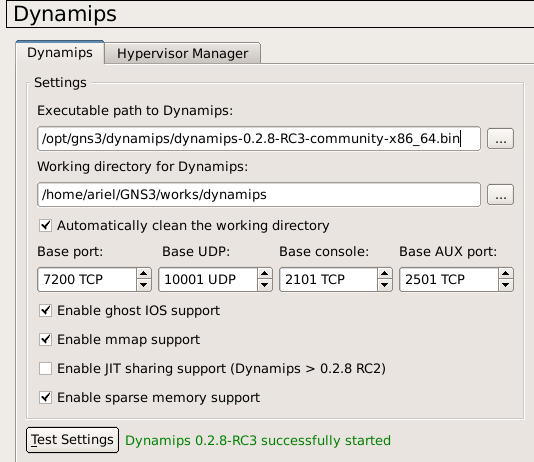
Dynamips settings